
Download RamSmash – RAM optimization, performance enhancement, memory management, system speed, process prioritization, computer efficiency
Overview
RamSmash is a productivity-focused application designed to improve computer performance through intelligent RAM optimization. The app analyzes running processes and reorganizes them to enhance memory efficiency, helping users achieve faster system responsiveness and smoother multitasking. By identifying non-essential background tasks and reallocating memory resources, RamSmash minimizes system waste and prioritizes critical operations. This makes it particularly valuable for users who rely on their computers for demanding tasks such as video editing, software development, or running multiple applications simultaneously.
Developed by Jason K. Menard, RamSmash has been available since 2014, indicating a long-standing presence in the system optimization space. Although the developer did not provide additional technical details about the app’s architecture or underlying algorithms, its core functionality centers on real-time memory management and process prioritization. The application is especially suited for users seeking a hands-off solution to maintain peak system performance without deep technical knowledge.
Real-world use cases include reducing lag during intensive workflows, improving startup times for resource-heavy programs, and preventing system slowdowns caused by memory bottlenecks. In the broader app ecosystem, RamSmash fills a niche for lightweight, focused tools that enhance system performance without requiring significant user input. Its continued availability suggests a stable and functional design, even as newer alternatives emerge.
Key Features & Functionality
- RAM Optimization: RamSmash continuously monitors active processes and adjusts memory allocation to maximize efficiency. By identifying memory-intensive tasks and reallocating resources, it reduces system strain and prevents slowdowns.
- Automated Process Management: The app autonomously evaluates background processes and determines which should be paused or prioritized based on user-defined or system-generated criteria. This reduces manual oversight and supports uninterrupted workflow.
- Speed Enhancement: Users can expect improved application load times and overall responsiveness. By freeing up unused RAM and streamlining memory usage, RamSmash contributes to a more fluid computing experience.
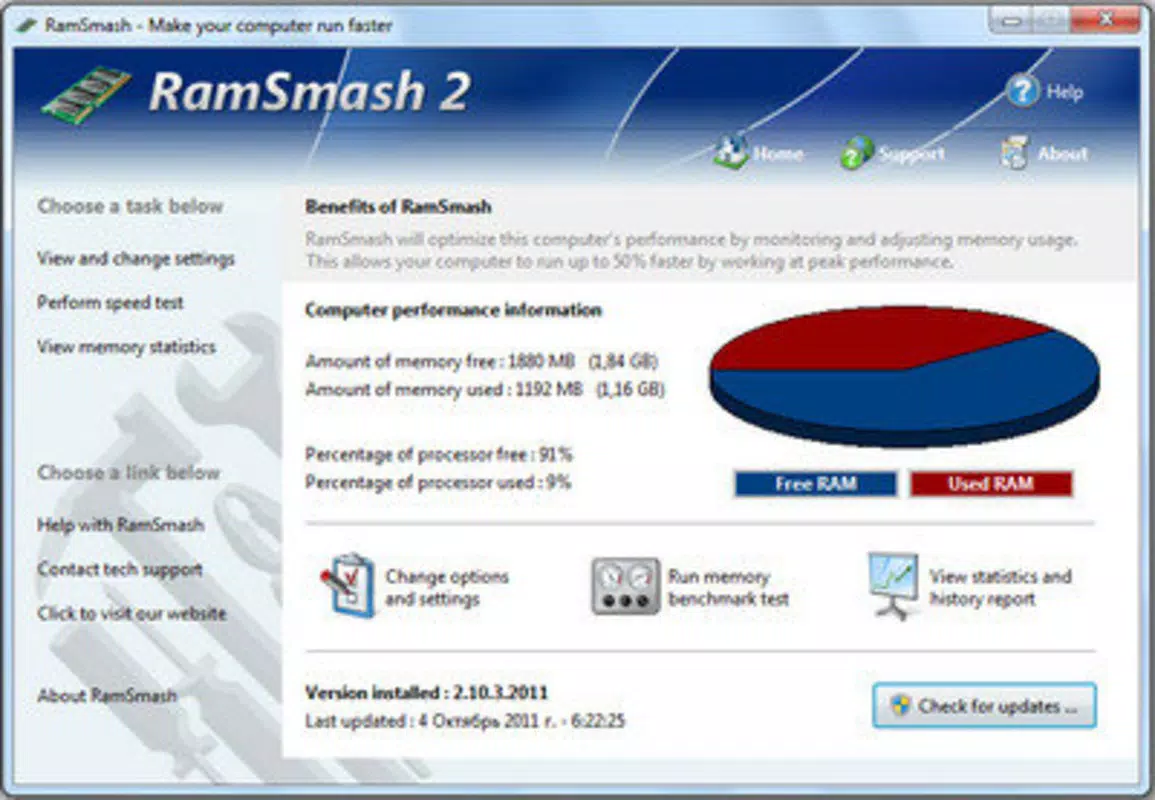
- User-Friendly Interface: The application features an intuitive layout that allows users of all experience levels to access core functions easily. Navigation is straightforward, with clear visual indicators for memory usage and process status.
- Resource Monitoring: Real-time tracking of system resources enables users to observe memory consumption trends and make informed decisions about task management and system usage.
For example, a graphic designer running multiple Adobe applications simultaneously may notice reduced lag after enabling RamSmash. Similarly, a student working on a research project with several browser tabs and document editors could benefit from faster switching between programs. These practical applications highlight how the app supports productivity in everyday computing scenarios.
Interface, UX & Performance
RamSmash presents a clean and minimalist interface, focusing on essential system data without visual clutter. The layout emphasizes real-time memory usage graphs, active process lists, and quick-access controls. Navigation is linear and predictable, allowing users to move between monitoring, optimization, and settings with minimal effort.
Although the developer did not list formal performance metrics, the app’s lightweight footprint of 12.3 MB suggests efficient resource utilization. It operates in the background with minimal impact on CPU or disk usage, ensuring it does not become a performance burden itself. Responsiveness is consistent across different device categories, including older or low-end systems, due to its focused design and modest system requirements.
Stability appears to be a key strength, as the app has remained in use since 2014. Users can expect reliable operation during extended sessions, with no reported crashes or memory leaks in publicly available data. The interface remains responsive even when handling high volumes of active processes, indicating solid underlying architecture.
Platform Compatibility & Technical Requirements
RamSmash is available exclusively for Windows, making it suitable for desktop and laptop users running the Windows operating system. The app requires no specific hardware beyond standard system capabilities for Windows-based machines. The software version is 1.0, and the file size is 12.3 MB, indicating a compact and lightweight installation.
The developer did not specify minimum OS requirements or compatibility with newer Windows versions. However, its long-standing release date (2014-04-29) suggests it may be optimized for older Windows releases such as Windows 7 or 8. Users on modern systems like Windows 10 or 11 should test compatibility, as some legacy applications may encounter issues with updated security protocols or system policies.
Although no updates have been documented since its initial release, the app’s continued availability implies functional stability. Users are advised to verify compatibility with their specific Windows version before installation.
Pros and Cons
Pros
- Lightweight design with a small file size of 12.3 MB.
- Intuitive interface suitable for users of all skill levels.
- Automated memory optimization reduces manual intervention.
- Real-time resource monitoring provides actionable insights.
- Long-standing presence suggests reliability and stability.
Cons
- No recent updates since 2014, raising concerns about compatibility with modern Windows versions.
- Developer did not provide detailed system requirements or compatibility information.
- Limited to Windows platform; no support for macOS or Linux.
- Price of $2.99 may be considered high for a legacy tool with no active development.
- No cloud sync, backup, or advanced customization options available.
FAQ
Is RamSmash safe to install and use?
Yes, RamSmash is designed as a system optimization tool and does not include malware or intrusive behavior. However, users should download it from trusted sources to ensure integrity.
Can RamSmash be used on Windows 10 or Windows 11?
While the app was released in 2014, compatibility with newer Windows versions is not officially confirmed. Users are advised to test it on their system before full reliance.
Does RamSmash require constant updates?
As of now, no updates have been released since the initial version. The app functions without requiring regular updates, but this also means it may not support new system features or security standards.
Is RamSmash free to download?
No, RamSmash is a paid application priced at $2.99. There is no free version or trial period available.
Can RamSmash be used on multiple computers?
Specific licensing details were not provided. Users should consult the developer’s official site for information on multi-device usage rights.
Final Thoughts + CTA
RamSmash remains a notable example of a focused, efficient system optimization tool that delivers tangible benefits in memory management and performance enhancement. While its age and lack of updates may raise concerns for users on modern systems, its lightweight design and intuitive interface continue to offer value for those seeking a simple, automated solution to RAM-related slowdowns.
It is best suited for users running older Windows systems or those who prefer minimal, no-frills tools that work reliably without constant maintenance. For professionals and students alike, the ability to improve system speed with minimal effort is a compelling advantage.
Despite its limitations, RamSmash provides a clear value proposition: a small investment for a potentially significant boost in computer efficiency. If your system struggles with memory bottlenecks and you’re looking for a straightforward fix, this app is worth considering.
Download RamSmash now


